Score Your AI Fluency
We built an open Claude skill based on Anthropic's 4D AI Fluency Framework that analyzes your conversation history and scores how effectively you collaborate with AI. Here's what we learned running it on ourselves.
Claude Code launched in beta a year ago this month. I started using it on day one.
Back then, almost nobody got what agentic coding was going to become. A year later, the question has moved from "should I use this?" to something harder: "am I actually using it well?"
Anthropic just published the AI Fluency Index, a study of 9,830 Claude.ai conversations measuring how effectively people collaborate with AI. The research builds on the 4D AI Fluency Framework by Professors Rick Dakan and Joseph Feller, which identifies 24 behaviors that separate effective AI users from everyone else.
When we read it, the reaction was immediate: this is what GitVelocity is about. Measurement. Not to punish. To improve.
So we built a Claude skill that runs the framework on your own conversation history and gives you a score. It works with both Claude Code and Claude Desktop. We've been using it internally at Headline. Today we're releasing it for anyone to try.
Why this matters for engineers
GitVelocity scores every merged PR across six dimensions of complexity. That's the output side. The artifact. The thing your customers actually experience.
But there's an input side too. How you work with AI shapes what you ship. An engineer who blindly accepts every AI-generated changeset ships different code than one who pushes back, catches gaps, and iterates until it's right.
Anthropic's research puts numbers on that gap. Only 8.7% of users check facts in AI output. Only 15.8% question the AI's reasoning. 85.7% do iterate, which is encouraging, but iteration alone isn't the whole picture. Users who iterate show 2x more fluency behaviors across all dimensions. It's the gateway, but the real separators are harder: discernment, strategic delegation, responsible use.
The 4D framework, quickly
Anthropic's framework breaks AI fluency into four competencies.
Delegation is the big picture. What's the goal? What should the AI handle vs. you? How do you divide the work? This isn't about offloading tasks. It's knowing when to hand something off and when to stay in the driver's seat.
Description is clear communication. Context, format requirements, examples of what good looks like, how you want the AI to approach the task. Goes way beyond "write me a prompt."
Discernment is critical evaluation. Are the facts right? Does the reasoning hold? Does this output actually help? Most AI interactions are small loops of description and discernment: describe what you need, evaluate what you get, refine.
Diligence is responsible use. Protecting data, being transparent about AI involvement, taking ownership of the final product. As Dakan puts it: "Diligence means taking ownership of your AI-assisted work and being willing to stand behind it."
What the skill actually does
The skill reads your Claude conversation history and analyzes your messages, not the AI's. It detects 11 observable behaviors from the Anthropic study plus 5 additional diligence signals, then scores you across 7 dimensions on a 1-10 scale.
On the behavior side, it checks whether you iterate, provide examples, specify format, set interaction mode, clarify goals, consult the AI on approach, identify missing context, question reasoning, and check facts.
On the dimension side, it scores specification, iteration, discernment, delegation, task decomposition, tool awareness, and diligence.
Then it compares your rates against Anthropic's population baselines and assigns a fluency level from Basic to Orchestrative.
I ran it on myself. Here's what I learned.
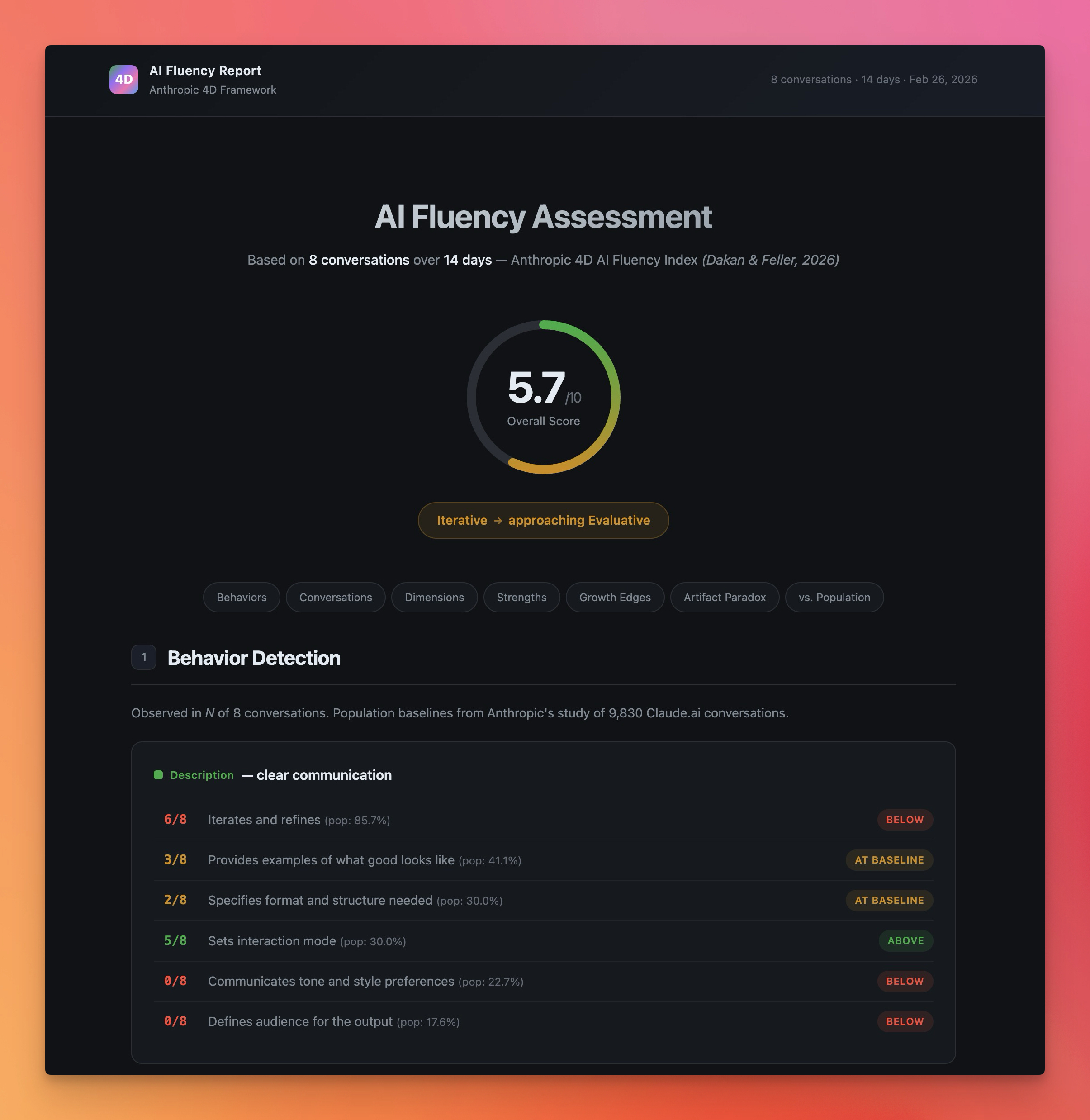
I ran the skill on my last two weeks of conversations. Eight sessions, ranging from production outage investigations to full-stack feature builds. Overall score: 5.7 out of 10. Level: Iterative, approaching Evaluative.
Not bad. Not great. But the averages hide the real story.
My best session was a legacy cleanup pass where we were removing old Metronic framework code from a production app. 13 messages. I asked "are you sure no more Metronic leftovers?" three separate times, finding new gaps each time. I reversed font deletions and made fine-grained keep/delete decisions. I caught a test failure the AI missed. Discernment: 8/10. Iteration: 8/10. Diligence: 7/10.
My worst session, at least by the numbers, was a full-stack feature implementation. "Load GV-183 from Linear and execute." Five messages total. The AI generated 17 files spanning backend entities, migrations, Bull queue processors, NestJS controllers, services, and a full React admin page. I never reviewed a single file. My response to completed Phase 1: "do phase 2 as well." Specification: 2/10. Discernment: 3/10. Diligence: 1/10.
There's context the skill can't see, though. Those Linear tickets are spec-driven product requirements. The conversation already happened, just not in Claude. We put the planning into our tickets: acceptance criteria, edge cases, architectural notes. By the time I type "execute it," the specification work is done. The skill scores the conversation, not the process around it.
Per-conversation breakdown:
| Session | Topic | Msgs | Spec | Iter | Disc | Deleg | Decomp | Tools | Dilig | Overall |
|---|---|---|---|---|---|---|---|---|---|---|
| 1 | Production outage investigation | 6 | 2 | 2 | 4 | 6 | 2 | 5 | 3 | 3.4 |
| 2 | Full-stack feature (GV-183) | 5 | 2 | 1 | 3 | 8 | 3 | 6 | 1 | 3.4 |
| 3 | Mastra workspace/sandbox | 19 | 5 | 7 | 6 | 7 | 5 | 8 | 6 | 6.3 |
| 4 | Legacy cleanup (EVA-8881) | 13 | 6 | 8 | 8 | 9 | 6 | 8 | 7 | 7.4 |
| 5 | Community scanning design | 12 | 6 | 7 | 6 | 7 | 3 | 6 | 4 | 5.6 |
| 6 | Legacy audit / Metronic cleanup | 5 | 4 | 6 | 7 | 8 | 5 | 7 | 7 | 6.3 |
| 7 | Elasticsearch list filtering | 8 | 6 | 8 | 7 | 9 | 6 | 7 | 6 | 7.0 |
| 8 | Email MCP doc update | 4 | 4 | 6 | 7 | 8 | 3 | 7 | 5 | 5.7 |
The pattern is sharper with more data. Delegation is my strongest dimension at 7.8 average -- I scored 8 or 9 on it in six of eight conversations. I use Linear tickets as specs, spawn agent teams for parallelism, and run /ship for the release pipeline. That workflow scored well. Discernment is also strong at 6.0, with a 75% fact-checking rate against Anthropic's 8.7% population baseline.
But specification (4.4) and task decomposition (4.1) are weak. My prompts are sparse. In five of eight conversations, the opening message is under two sentences. I almost never break work into explicit steps or phases -- I let the AI figure that out. And diligence (4.9) is bimodal: thorough when I feel the stakes, absent when I don't.
Here's what surprised me in the population comparison: my fluency profile is inverted from the norm. Most users are strong on Description (telling the AI what to do) but weak on Discernment (evaluating what comes back). I'm the opposite. Lean prompts, but I catch things. For a senior engineer working with capable AI, that might be the right tradeoff.
The artifact paradox
This was the finding that stuck with me. Anthropic calls it the artifact paradox: when AI generates polished output, especially code, users become more directive but less critical. Fact-checking, questioning reasoning, catching missing context -- all three drop when the output looks good.
With eight conversations, I now have one textbook case and one clear counter-example.
The textbook case: Session 2 (GV-183). The AI generated 17 files spanning backend entities, migrations, queue processors, controllers, services, and a full React admin page. I never reviewed a single file. Discernment: 3. Iteration: 1. Diligence: 1.
The counter-example: Session 4 (EVA-8881). The AI also produced substantial code changes -- a legacy cleanup pass touching dozens of files. But I asked "are you sure?" three times, reversed font deletions when I disagreed, made fine-grained keep/delete decisions, and caught a test failure. Discernment: 8. Iteration: 8. Diligence: 7.
The pattern: the artifact paradox activates when the task feels like greenfield or isolated work (new features, separate modules) and deactivates when it touches production systems I'm familiar with. In Session 4, I know the codebase. I know what breaking a font import does. That domain familiarity triggers scrutiny. In Session 2, it was all new code in a new area, so polished output felt trustworthy.
The risk: greenfield code still ships to production eventually. And the skill only sees the conversation. It doesn't see me in the browser testing the feature after it ships. It doesn't see me reviewing the PR diff on GitHub. The Anthropic paper acknowledges this: many diligence and discernment behaviors happen offline. But the gap between a 7.4 and a 3.4 overall score in sessions with comparable code output is hard to explain away entirely.
Where this fits the GitVelocity philosophy
We use Claude to evaluate every merged PR's complexity. That's the output measurement, and it's the metric that matters most because it reflects what reaches customers.
AI Fluency is more of an input measurement. It scores the skills that determine how you produce those artifacts. GitVelocity doesn't incorporate AI Fluency into its scoring right now, and for good reason: much of fluency happens offline. You review diffs in a different tool. You discuss architecture in Slack. You test manually before merging. Those behaviors are invisible to conversation analysis.
But the observable portion is still useful. If an engineer consistently scores low on discernment, never questioning AI reasoning, never catching missing context, that's a signal worth paying attention to.
We think about it this way: PR scoring measures what reaches customers. AI Fluency is a leading indicator -- it scores the habits that shape those outcomes. An engineer who gets better at fluency will probably ship better code too, because they'll catch more bugs before merging and challenge more assumptions during implementation.
A lot of engineers have asked us, "How do I get better at working with AI?" This skill gives a concrete answer. It shows which behaviors you're missing and compares you to population baselines. And since it runs inside Claude, you can improve while using the tool, then re-measure to see if anything changed.
How to use the skill
It works with both Claude Code and Claude Desktop. Three steps.
- Install the prerequisite:
uv tool install cc-conversation-search
This indexes your Claude conversation history so the skill can find past sessions.
Add the skill to your project. Download the skill zip and extract it into
.claude/skills/ai-fluency/in your project. It includes the skill definition and an HTML report template.In Claude Code, type
/ai-fluency.
It analyzes the last 2 weeks by default. You can also run /ai-fluency 7 for the last 7 days, /ai-fluency "authentication" to filter by topic, or /ai-fluency all for everything indexed.
The skill spins up parallel agents to read your conversations and produces an HTML report with scores, population comparisons, and direct quotes from your sessions as evidence.
What to do with your score
The score isn't the point. Getting better is.
If you score low on discernment (most people will), start with one habit: before accepting AI-generated code, ask yourself whether you'd be comfortable defending it in code review. That single question changes the dynamic.
If you score low on specification, spend 15 seconds before your first message asking: "What does the AI need to know that it can't find in the codebase?" Even one sentence of constraint can prevent an entire correction cycle. My own spec score jumped from 2 to 6 in sessions where I added a single line of context upfront.
If you score low on task decomposition, try a one-sentence breakdown before delegating: "Phase 1: audit. Phase 2: delete with my approval. Phase 3: ship." This gives natural review checkpoints without micromanaging.
If you score low on delegation, try framing the task before you start. "I need retry logic on the payment handler. We can't retry non-idempotent operations." Ten seconds of context changes the entire output.
If you see the artifact paradox in your data, pay attention. When the AI produces working code that passes tests, that's exactly when you should engage more. My own data shows the paradox activates on greenfield work and deactivates on familiar codebases. After any implementation session, spend 60 seconds scanning the git diff. If your domain knowledge is strong, a quick scan will catch most issues.
Measure yourself
We're releasing this because engineers should measure their process, not just their output. Fluency isn't fixed. It gets better when you pay attention to it.
Run /ai-fluency. See where you land. Share your score with your team if you're feeling brave. I shared mine above, warts and all. The engineers who measure themselves improve faster. That's been true for code quality for decades, and it's true for AI collaboration now.
I've been using Claude Code since the beta dropped in February 2025. A year in, the question isn't whether to use AI. It's whether you're using it well. And you can't improve what you don't measure.
Download the AI Fluency skill and run /ai-fluency in your next Claude session.
GitVelocity measures engineering velocity by scoring every merged PR using AI, regardless of whether AI helped write it. See how it works.

Conrad is CTO and Partner at Headline, where he leads data-driven investment across early stage and growth funds with over $4B in AUM. Before becoming an investor, he founded Munchery (raised $130M+) and held engineering and product leadership roles at IAC and Convio (IPO 2010). He and the Headline engineering team built GitVelocity to help engineering organizations roll out agentic coding and measure its impact.