Historical Backfill
Scoring Past Work
By default, GitVelocity scores pull requests as they merge going forward. But if you want to see how your team's velocity looked before you started using the platform, you can trigger a historical backfill to analyze previously merged PRs.
How It Works
After connecting a repository, navigate to Settings → Historical Backfill and start a backfill. You choose how many months of history to analyze. We recommend starting with at least three months -- enough for meaningful trends without a long wait. GitVelocity retrieves merged pull requests from the selected window and analyzes each one with the configured AI model, applying the same six-dimension scoring framework used for new PRs.
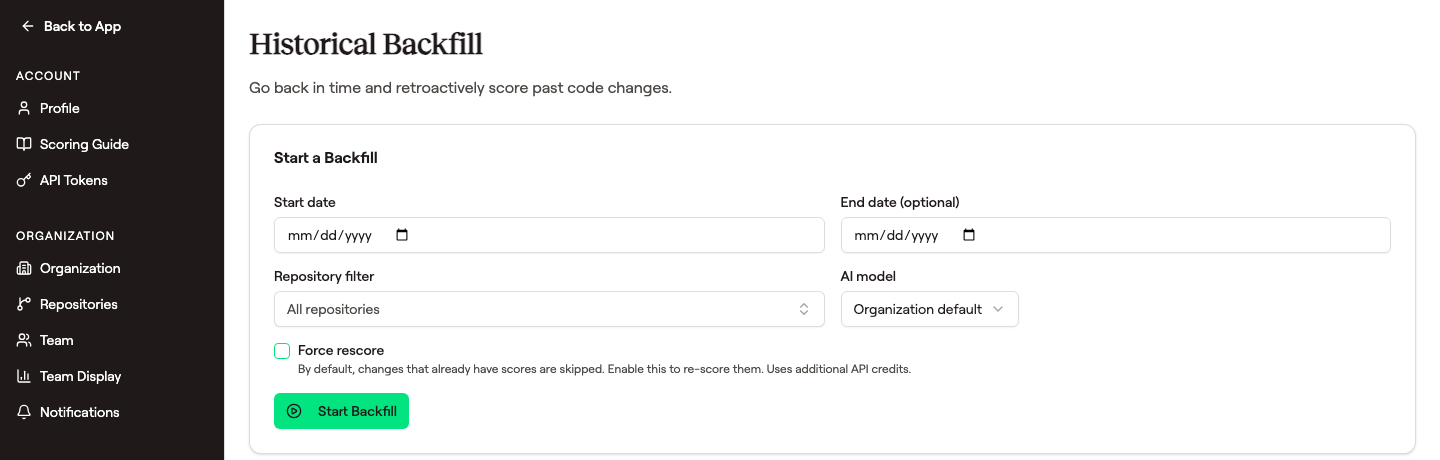 The Start a Backfill card is the entire interface — pick a date range, repository filter, model, then click Start Backfill. Past jobs appear underneath in a Recent Backfill Jobs table.
Processing Time
Each PR takes approximately 30 seconds to analyze. For a repository with 200 merged PRs in the backfill window, expect the process to take roughly 90 minutes to complete. Larger repositories will take proportionally longer.
Background Processing
Backfill runs entirely in the background. You can continue using the dashboard, viewing scores for already-processed PRs, and working with other repositories while the backfill progresses. There is no need to keep the browser open.
Progress Tracking
A progress indicator on the repository settings page shows how many PRs have been processed and how many remain. You can check back at any time to see the current status.
Why Backfill Matters
Establish Baselines
Backfilled data gives you a baseline for comparison. When you can see velocity from the past several months, current performance has meaningful context.
Identify Trends
Historical scores reveal long-term patterns that would otherwise be invisible -- seasonal shifts, the impact of team changes, or gradual increases in complexity as a codebase matures.
Immediate Value
Instead of waiting weeks or months to accumulate enough data for useful trends, backfill lets you start with a rich dataset from day one.
Frequently Asked Questions
How far back can I backfill?
You can set any number of months. We recommend starting with at least three months to establish meaningful trend lines. You can always run a larger backfill later if you want deeper history.
Does backfill cost extra?
No. Backfill is included and uses the same scoring pipeline as real-time analysis. Backfill consumes API credits on whichever provider key you connect at the same rate as forward scoring -- approximately one API call per PR.
What happens if I run a backfill again?
Backfills are safe to re-run. Subsequent runs automatically skip PRs that already have scores, so you will not be charged twice for the same pull request. You can re-run a backfill over the same time window, extend the range, or overlap with previous backfills without any risk of duplicate scoring or extra API costs. Only unscored PRs are analyzed.
This means you can safely use backfill incrementally -- for example, running a two-week backfill first to verify everything looks right, then expanding to several months. The second run will pick up only the PRs that were not covered by the first.
Can I force rescore PRs that were already scored?
Yes. When starting a backfill, you can enable the Force rescore option. When this is turned on, every PR in the selected date range will be re-analyzed and scored again, replacing any existing scores. This is useful when:
- You switch to a different AI model and want scores generated by the new model.
- You want to re-evaluate past results after changes to the scoring framework.
- You are testing or comparing scoring behavior across models.
Force rescore is off by default to prevent accidental API costs. When enabled, a warning is displayed to confirm that all PRs in the range will be re-scored. If you need to rescore just a single PR or direct commit, you can also do that from the Activity page (three-dot menu → Rescore) without running a full backfill.