Webhooks
Overview
Webhooks are how GitVelocity receives real-time events from your version control provider. When a pull request is opened, updated, or merged, GitHub (or Bitbucket/GitLab) sends an event to GitVelocity, which triggers scoring based on your score settings.
How Webhooks Work
During repository setup, GitVelocity registers a webhook with your VCS provider. From that point on, the provider sends event payloads to GitVelocity automatically whenever relevant PR activity occurs. No manual intervention is needed for normal operation.
Webhook Status
The Processing Log page (under Admin Tools in the settings sidebar) shows the delivery and processing status of every webhook event received from your VCS provider.
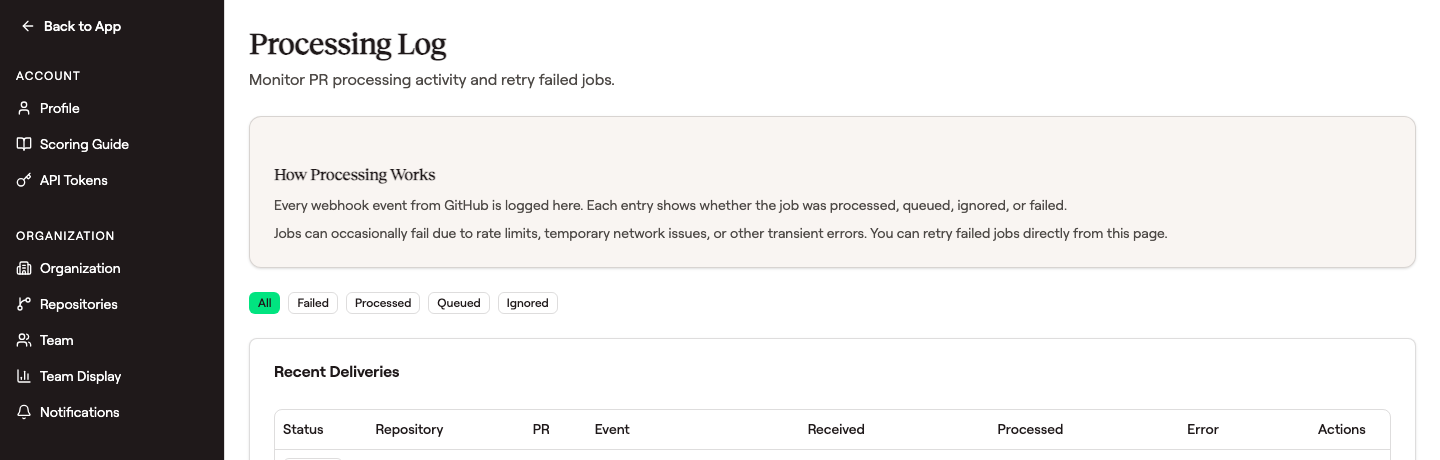 Filter by tab to triage — Failed surfaces deliveries that errored, Queued shows backlog, Ignored explains why an event wasn't scored, and the Actions column lets you retry a failed delivery.
For each delivery you can see:
- Status -- whether the job was processed, queued, ignored, or failed
- Repository and PR -- which repository and pull request the event was for
- Event type -- the GitHub event name (e.g.
pull_request.opened,pull_request.synchronize) - Timestamps -- when the event was received and when processing completed
- Error -- the error message for any failed deliveries, with a retry action
A healthy connection shows recent activity in the Processed tab and few or no entries in Failed. If a repository hasn't sent events in a while, that may indicate a problem.
Partial webhook coverage
Not every tracked repository necessarily has a working webhook. The Repositories page reports what is actually true -- for example, "Receiving webhook events for 2 of 18 tracked repositories" -- rather than assuming a connected provider means full coverage.
Two things cause a shortfall:
- The connecting account lacks admin access on those repositories, so GitVelocity was not permitted to install a webhook. Reconnect with an account that has admin rights and the missing webhooks are registered.
- Registration failed for another reason, such as a transient provider or network error. This is not a permissions problem; saving your tracked repositories again retries it.
Repositories without a webhook are still analyzed -- GitVelocity polls for their pull requests instead -- but events arrive on a delay rather than immediately.
Troubleshooting
If PRs aren't being scored, check the following:
No Events Received
- Verify the webhook is still registered in your VCS provider's settings (GitHub: repository Settings > Webhooks)
- Check that the repository is still connected in GitVelocity
- Confirm that the VCS provider isn't experiencing an outage
Events Received but Not Scored
- Check if scoring is paused for the repository
- Verify the PR isn't being caught by an exclusion filter
- Confirm the PR targets the default branch (PRs merged to non-default branches are not scored by default)
Connection No Longer Authorized
If your VCS connection has been revoked or has expired, GitVelocity can no longer fetch diffs for your pull requests. Deliveries for the affected repositories show a status of Ignored rather than Failed, because retrying cannot succeed until the connection is restored.
This can happen if the GitVelocity app's access was revoked in your VCS provider, if an administrator who authorized the connection left the workspace, or if the authorization simply expired.
You do not have to notice this yourself. When GitVelocity detects that a Bitbucket or GitLab authorization has stopped working, owners and admins see a banner across the app and receive one email explaining what broke and how to fix it. The Repositories page shows the connection in a failed state rather than a healthy one for as long as it stays that way.
To fix it, disconnect and reconnect the provider in GitVelocity. Reconnect using an account with admin access to your repositories -- a reconnect from an account without it restores pull-request collection but cannot re-register webhooks, which leaves most repositories on slower polling. The banner clears as soon as the reconnect succeeds.
New pull requests are scored again from that point; use historical backfill to score the pull requests opened while the connection was down. Nothing is backfilled automatically.
Delivery Failures
- Temporary failures usually resolve on their own -- VCS providers retry failed deliveries
- Persistent failures may indicate a permissions change on the repository
- If the webhook secret has been rotated or the webhook was deleted and recreated, you may need to reconnect the repository in GitVelocity