Repositories
Repository Management
The Repositories page lists every GitHub repository connected to GitVelocity, along with its current status and key metrics. From here you can add new repositories, remove ones you no longer want to track, and configure scoring settings.
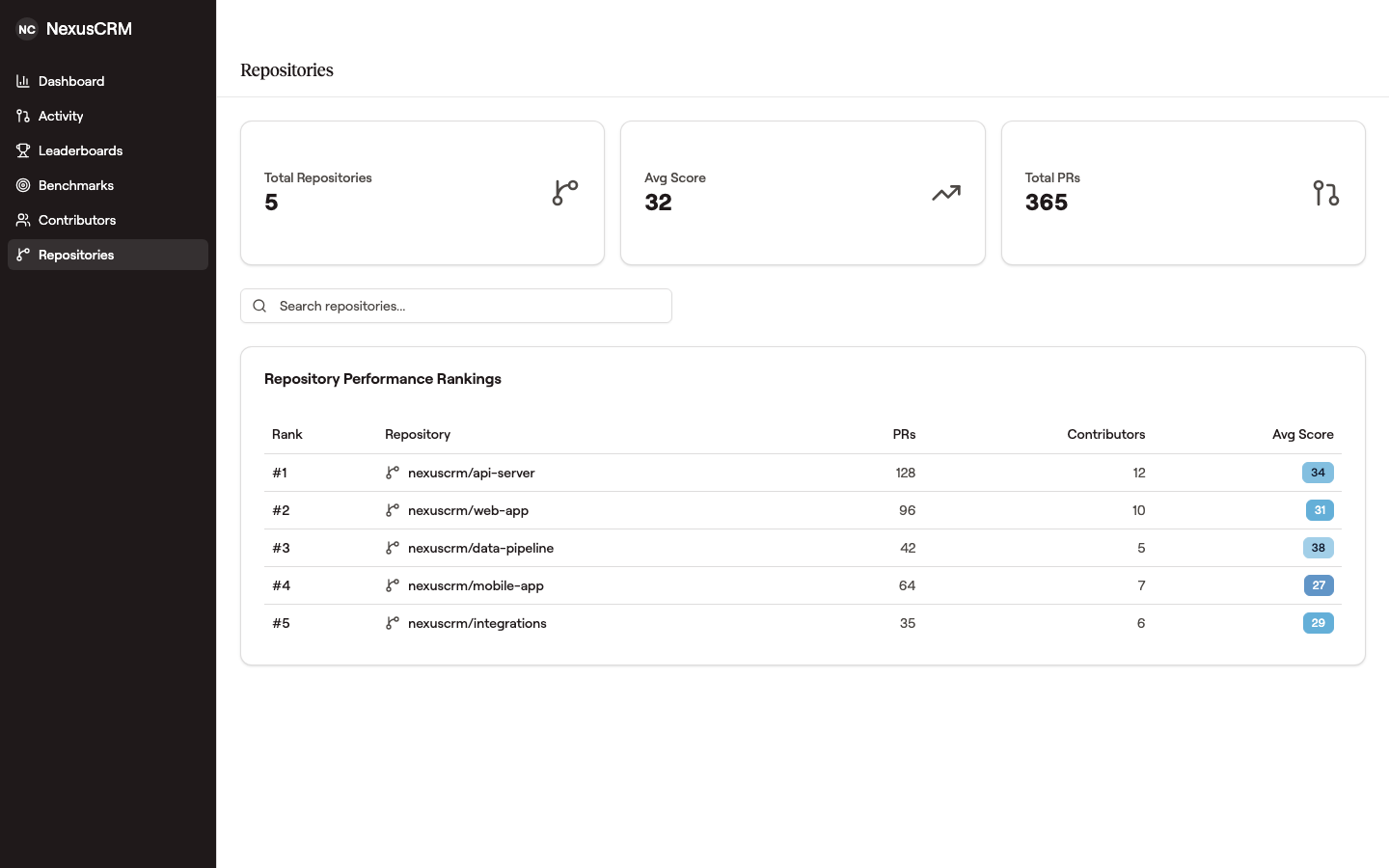 Each row is one repository ranked by average score, with PR count and contributor count next to it — useful for spotting which repos are receiving the most complexity and which are flat.
Adding and Removing Repositories
To add a repository, click Add Repository and select from the list of repositories available through your GitHub App installation. Scoring begins automatically for new merged PRs once a repository is added. To stop tracking a repository, remove it from the list -- historical data is retained.
Excluding Repositories
If your GitHub App is set to All repositories, GitVelocity tracks every repository it can access by default -- you do not need to maintain an allowlist. For large organizations with hundreds of repositories and new ones created regularly, this is the recommended setup.
To keep a few specific repositories out of scoring -- for example, repositories that hold auto-generated or deploy-only code -- open Settings → Repositories and use the Excluded Repositories panel. Search for a repository and click Exclude; it stops being scored going forward, and its past scores are removed from your metrics. Everything not listed stays tracked. To bring a repository back, click Track again.
Excluding a repository removes its contribution from your metrics right away -- its historical scores are hidden from dashboards, leaderboards, trends, and benchmarks, and it stops being scored going forward. Nothing is deleted: the scores are kept, so clicking Track again brings the repository and all of its historical metrics straight back. Metrics reflect the change the next time a page loads. Managing exclusions requires an owner or admin role.
Repository-Level Metrics
Each repository card displays summary metrics including:
- Average Score -- The mean complexity score across all scored PRs
- PR Volume -- Total number of PRs scored in the selected time range
- Active Contributors -- Number of engineers who merged scored PRs
- Total Velocity -- Sum of all PR scores, reflecting both volume and complexity
These metrics update as new PRs merge and get scored.
Repository Settings
Individual repository settings let you enable or disable automatic scoring. This is useful if you want to pause analysis temporarily -- for example, during a large migration where scoring would not be meaningful.
Renaming a Repository
Renaming a repository on GitHub is safe: GitVelocity detects the rename and carries the repository's full scoring history over to the new name automatically. Existing PR scores keep their original dates, trends stay continuous, and nothing is scored twice. If a rename ever leaves scores split across the old and new names (for example, a rename that happened while GitVelocity was disconnected), contact support -- the history can be merged.
Comparing Repositories
Use the repository view to compare metrics across repositories side by side. This helps identify which codebases are seeing the most activity, where the highest-complexity work is concentrated, and how different teams or projects compare in terms of output.
Organization Overview
At the top of the page, an organization-level summary aggregates metrics across all connected repositories. This gives managers a single view of total engineering output without needing to check each repository individually.