Leaderboards and Achievements
GitVelocity leaderboards are designed so that every engineer has a place to shine -- regardless of whether they work on backend infrastructure, frontend features, or DevOps. The goal is recognition, not competition.
The Leaderboards page opens on the velocity map. The four leaderboards and the Recognition Feed are below it.
The velocity map
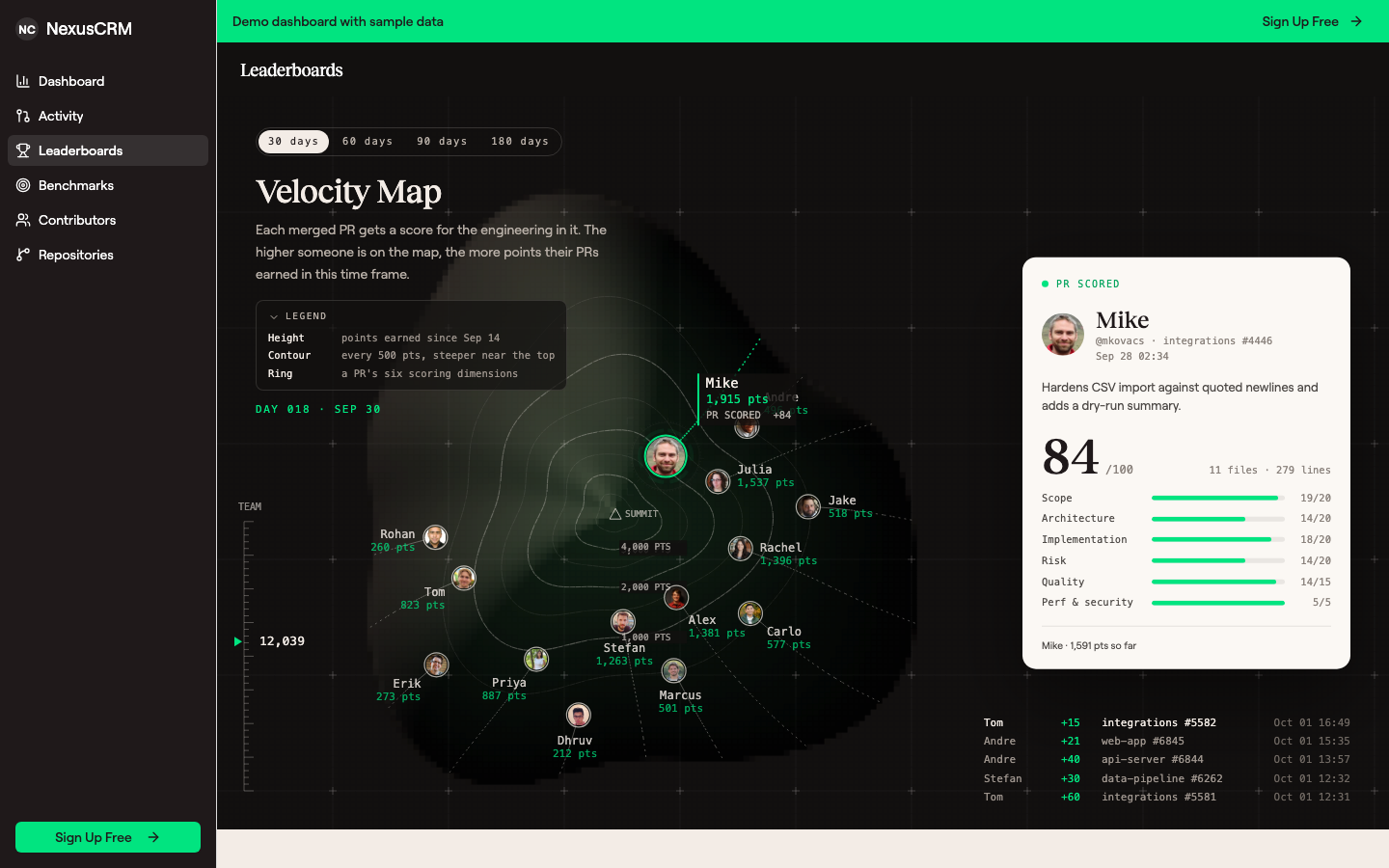 The velocity map. Each engineer's height is the points they earned in the time frame, and the card shows the PR that was just scored.
The velocity map shows how much engineering each person on your team shipped in the time frame, drawn as a climb up a mountain. Every merged PR moves its author up by the points it scored.
Each engineer has their own path up a different side of the mountain. The paths are spread around the slope, and the people next to each other are not the people closest in points, so where someone sits on the map does not rank them.
Height is points. The contour lines are labelled in points, and the legend gives the spacing (for example, every 1,000 points). The slope is steeper near the top, which means an engineer's first few hundred points move them a visible distance from the bottom. The top of the mountain is set a little above whoever has the most points.
It replays the time frame. The map plays back the selected window at about one day per second, and the current date shows under the legend. The feed in the bottom-right corner lists each PR as it is scored: who wrote it, its points, its repository and PR number, and when it merged.
The card shows the PR that was just scored. Every few seconds the map highlights the author of the highest-scoring recent PR, and the card on the right shows that PR: its summary, its score out of 100, and its six dimension scores. Each dimension is shown against its own maximum: Scope, Architecture, Implementation and Risk out of 20, Quality out of 15, and Performance and Security out of 5. The six arcs of the ring around the author show the same six scores. When a PR's final score is lower than the sum of its six scores because it was a small change, the card shows the adjustment, for example base 56 × size 0.29. See Effort Scale Factor.
Who is on the map. Everyone with scored PRs in the time frame. The 20 engineers with the most points, and you, are drawn with their photo and name; everyone else is a small mark on the slope at their real height. Hover a mark to see who it is, or click it to follow them. The map uses the same rules as the leaderboards below, so bots, suspended contributors, dismissed authors and untracked repositories are left out.
Using the map
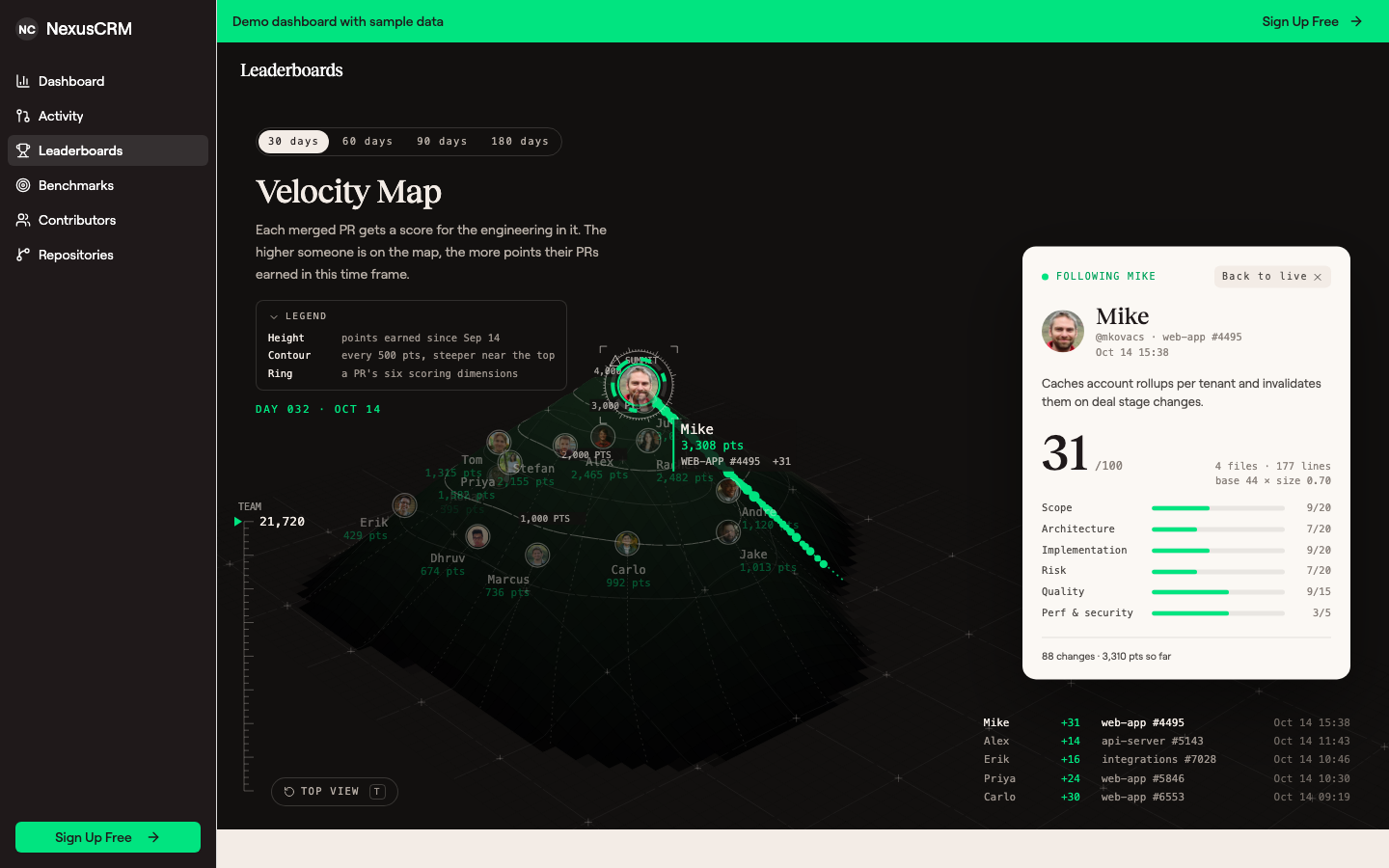 Following one engineer. Their path shows a marker for every change they merged, and the card shows their PRs.
- Time frame. Choose 30, 60, 90 or 180 days above the title. The default is 30 days, a window short enough that a strong couple of weeks visibly moves someone up; each option is the last 30, 60, 90 or 180 days up to today.
- Legend. Click Legend to hide it. Your browser remembers, so it stays hidden next time; click it again to bring it back.
- 3D view. Move the pointer over the map and it tilts into 3D. When the pointer stops, it returns to the flat view after a few seconds.
- Rotate. Drag to turn the map and see the other side. Engineers hidden behind the slope are shown faded.
- Top view. Click Top view in the lower left, or press T, to go back to the flat view.
- Follow an engineer. Click someone's avatar. Their path shows a marker for each change they merged, sized by its score, and the card shows their newest PR. Hover a marker to see that PR. Press Esc, click an empty part of the map, or click Back to live to stop following.
If your system is set to reduce motion, the map does not animate. It shows the end of the time frame with the highest-scoring PR on the card, and you can still follow an engineer.
The leaderboards
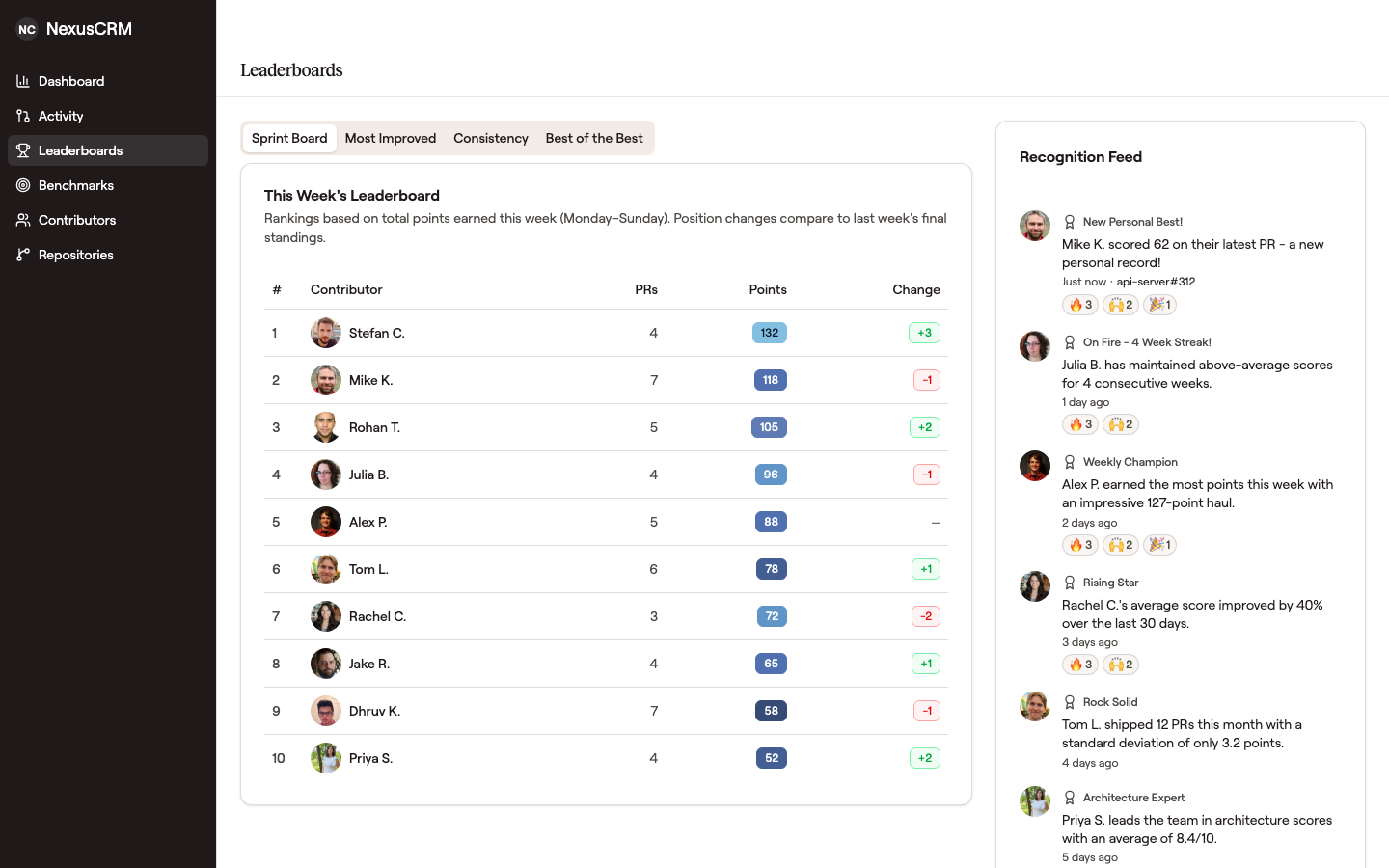 The four leaderboards and the Recognition Feed, below the velocity map.
Four leaderboards sit below the velocity map: Sprint Board, Most Improved, Consistency, and Best of the Best. The Recognition Feed next to them lists achievements as they happen.
Sprint Board
The Sprint Board is a weekly leaderboard that resets every Monday. It ranks contributors by total points earned during the current week (Monday through Sunday).
Each entry shows the contributor's PR count, total points, and position change compared to the previous week. This gives a quick pulse on who is shipping right now and whether momentum is building or cooling off.
The weekly reset means no one is permanently behind. Every week is a fresh start.
Most Improved
The Most Improved leaderboard highlights engineers whose average PR score has increased the most over the past 30 days compared to their prior 30-day baseline. Contributors need at least 2 PRs in each period to qualify.
This leaderboard surfaces growth that top-line rankings might miss. An engineer who went from averaging 12 to averaging 25 is making real progress -- and that progress deserves visibility, even if they are not topping the overall charts.
Consistency Leaders
The Consistency leaderboard ranks contributors by how steadily they ship over the past 30 days, combining PR volume, average score, and total points. This is not about one big week -- it is about showing up consistently and shipping.
Engineers who maintain a steady cadence of well-scoped PRs perform well here. Consistency is one of the strongest signals of a healthy engineering workflow, and this leaderboard makes it visible.
Best of the Best
The Best of the Best is a specialization leaderboard. It breaks down performance by each of the six scoring dimensions and highlights who excels at what. Contributors need 5 or more PRs in the last 30 days to qualify.
Each dimension has its own ranking with a creative label:
| Title | Dimension | Max Score |
|---|---|---|
| The Big Movers | Scope | 20 |
| The Master Builders | Architecture | 20 |
| The Code Whisperers | Implementation | 20 |
| The Daredevils | Risk | 20 |
| The Perfectionists | Quality | 15 |
| The Vault Keepers | Performance/Security | 5 |
This is one of the most popular leaderboards because it recognizes that different engineers bring different strengths. A backend engineer who consistently handles high-risk database migrations gets recognized alongside a frontend engineer who excels at implementation complexity. There is a place for everyone.
Achievements
The recognition feed highlights milestone accomplishments as they happen:
- Personal Best -- You hit a new personal high score on a PR
- Dimension Record -- You achieved your best-ever score in a specific dimension
- New Monthly High -- Your monthly performance reached a new peak
- Cumulative Milestone -- You reached a cumulative scored PR count (e.g., 50, 100, 250)
- PR of the Month -- Your PR was the highest-scoring of the month
Achievements surface in contributor profiles and on the leaderboard page. They are designed to celebrate progress and consistency, not to create pressure.
Momentum Tracking
Each contributor has a momentum indicator showing their recent activity trend:
- Trending up -- Rising velocity over recent weeks
- Steady -- Consistent pace
- Cooling off -- Activity has slowed
- Hot right now -- 3 or more PRs in the last 7 days
Momentum tracking gives managers and teammates a quick visual sense of who is actively shipping without needing to dig into the data.
Philosophy
Top-line velocity matters -- every team wants to see who is shipping the most engineering. But GitVelocity's leaderboards go beyond that single metric. The velocity map shows each engineer's points for the time frame. The Sprint Board rewards weekly velocity. Most Improved rewards growth. Consistency Leaders reward reliability. Best of the Best rewards specialization.
No matter what role you play on the team or what kind of work you do, there is a leaderboard where your contributions are visible. That is the point -- making all engineering work recognized, not just the flashiest PRs.
Frequently Asked Questions
Are leaderboards visible to the whole organization?
Yes. Leaderboards are visible to everyone in the organization. They are designed to celebrate contributions and build team morale, not to create pressure. If you want to understand how to introduce leaderboards to your team, see For Engineering Managers.
What if I mostly work on small PRs?
Small PRs are great. The Consistency Leaders leaderboard rewards steady shipping regardless of individual PR size. An engineer who ships many well-scoped, smaller PRs consistently will perform well on the Consistency board and accumulate significant total velocity over time.
Why does a PR show 9/100 when its six scores add up to much more?
The six dimension scores make up the base score, and the final score adjusts it for the size of the change. A small change with a high base score can end up with a low final score. The card on the velocity map shows the adjustment whenever it applies, for example base 77 × size 0.12. See Effort Scale Factor.
Why can't I find someone on the velocity map?
They are probably a mark rather than a photo. The map names the 20 engineers with the most points in the time frame, plus you; everyone else is a mark at their real height. Hover the marks to find them, or try a longer time frame. Suspended contributors and bots are left out, as on every leaderboard.
Can I opt out of leaderboards?
Leaderboards are an organization-level feature. Individual opt-out is not currently supported, but the design intentionally avoids a single "top performer" ranking. With four different leaderboards emphasizing different strengths, every engineer has a place to shine.