Score Settings
Overview
Score settings control when GitVelocity analyzes pull requests and how results are shared. These options are configured for the organization on the AI Scoring settings page under Score Settings.
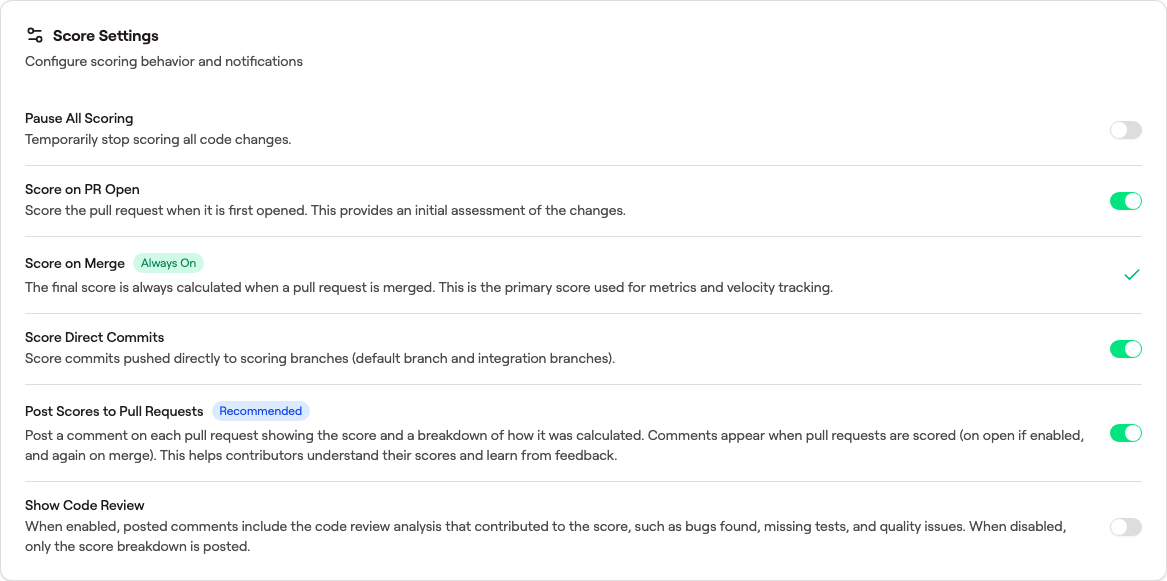 Every setting documented on this page is a toggle on the same card under Settings → AI Scoring → Score Settings.
Pause Scoring
Toggle Pause Scoring to temporarily stop all scoring for a repository. No PRs will be analyzed while scoring is paused, regardless of other settings.
This is useful during large migrations, repository restructuring, or any period where scoring results wouldn't be meaningful. Re-enable scoring when you're ready, and any PRs that merged while paused will not be retroactively scored.
Score on PR Open
Enable Score on PR Open to trigger scoring when a pull request is opened, not just when it merges. This gives the team early visibility into PR complexity before the code lands.
When enabled, the score updates automatically if the PR changes before merge. The final score is always based on the merged diff.
Score on Each Push
Enable Score on Each Push to re-score a pull request on every push after it's opened, so contributors can see how the PR currently scores as they iterate toward merge. Each re-score analyzes the entire pull request — the full diff against the base branch, not just the latest push — and posts a preview-score comment on the PR noting which commit it reflects.
These push scores are a preview only. They never affect metrics, velocity, or the leaderboard — only the score at merge is counted (see Score on Merge). Each settled push posts its own preview comment in the PR timeline, so a PR with several pushes will accumulate several preview comments. If commits are pushed in quick succession, GitVelocity coalesces them so only one comment is posted per burst rather than one per intermediate commit.
This setting is independent of Post Scores to GitHub: turning on Score on Each Push posts the preview-score comment on its own. It is off by default and applies only to pushes after a PR is opened — the initial open is controlled by Score on PR Open.
Score on Merge
Score on Merge is the default scoring trigger. PRs are scored when they merge to the default branch. This is the most common configuration and ensures scores reflect the final state of the code.
You can enable both Score on PR Open and Score on Merge simultaneously to get early feedback and a final score.
Post Scores to GitHub
Enable Post Scores to GitHub to automatically post the velocity score as a comment on the pull request in GitHub. This lets the team see scores without leaving GitHub.
The comment includes the overall score, dimension breakdown, and a link to the full analysis in GitVelocity.
Show Code Review
Enable Show Code Review to display an AI-generated code review alongside the numeric score. The review provides detailed, line-level feedback on the PR beyond the score itself.
This is particularly useful for teams that want to use GitVelocity as a supplementary code review tool in addition to velocity measurement.
AI & Skill Files
The AI & Skill Files (always counted) setting on the AI Scoring Settings page recognizes Claude Code skills, slash commands, sub-agents, and memory files as behavioral code so they earn proportional scores. The default patterns cover the standard .claude/skills/, .claude/commands/, .claude/agents/, CLAUDE.md, and AGENTS.md layout. Add custom patterns here only if your monorepo uses a non-standard skill directory structure. See AI Artifact Scoring for the full list of recognized patterns and how the score differs for these files.