Benchmarks
How much room do you have to improve?
Every team ships code. The question is whether you're shipping as much complexity as you could be, and where to invest next. The Benchmarks page answers both.
Benchmarks give you external context: how your team's output compares to other engineering organizations on the platform, where your strengths are, and where you have the most headroom. It's the difference between knowing you shipped 200 points last month and knowing that puts you ahead of 68% of teams.
Every section connects to something you can act on.
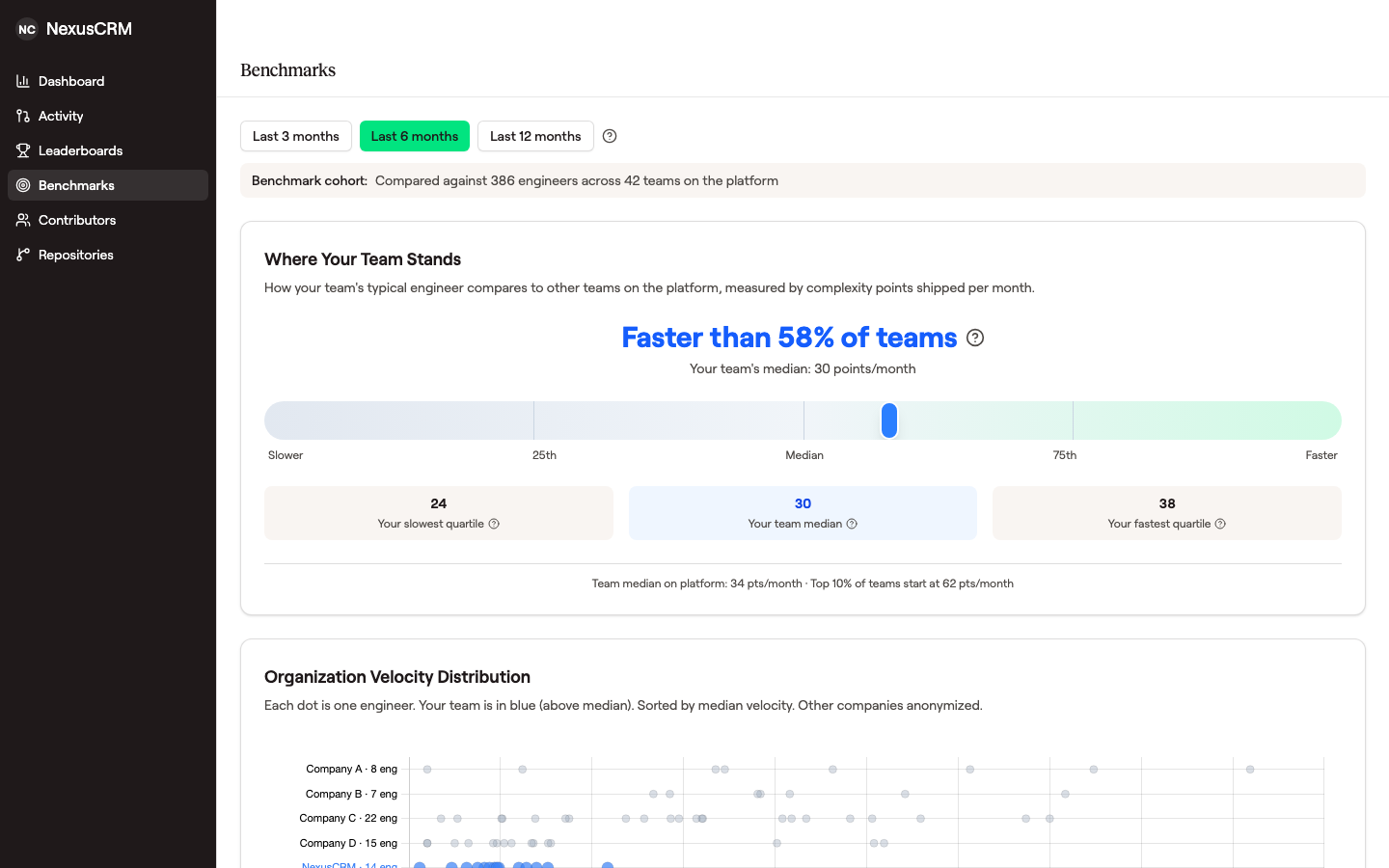 The top card sets the headline — what percentile you sit at — and the scatter plot below it shows where each engineer lands relative to anonymized peer organizations.
Getting access
Benchmarks are enabled per organization. Contact us to turn them on.
There's a minimum data threshold: at least 3 engineers with 5 or more scored pull requests each in the selected time window. As your team merges PRs, benchmark data will appear automatically.
Time window
You can view benchmarks across 3-month, 6-month, or 12-month windows.
The default is 6 months. Shorter windows are better for seeing the impact of a recent change (a new hire, a process shift). The 12-month window is better for board reporting and longer-term trends.
Switching the window also changes who is included: only engineers with at least 5 scored changes (pull requests or commits) inside the selected window appear in the comparison.
Benchmark cohort
The page shows who you're being compared against: the total number of engineers and teams in the comparison set.
Two things to know:
- Benchmark data is aggregated and anonymized so no company or individual outside your own team is identifiable.
- Data refreshes weekly from snapshots, not in real time.
What you'll see
Where your team stands
How does your team's typical engineer compare to everyone else?
"Faster than X% of teams" means your team's median engineer ships more complexity per month than X% of other teams on the platform. Every PR your engineers merge receives a complexity score (0 to 100) from AI analysis. Those scores are summed and divided by active months to get each engineer's velocity (points per month). The platform comparison uses the median across your engineers vs. the median of every other team.
You'll also see your team's internal range: the 25th percentile (your lower-output engineers' pace), the median (the number used for platform comparisons), and the 75th percentile (your highest-output engineers' pace). Plus platform context: the median velocity across all teams and the threshold where the top 10% starts.
If your team is below the 50th percentile, jump to "Where to Focus" for specific guidance. If you're above, check concentration to make sure the pace is sustainable.
Organization velocity distribution
Engineers across organizations on the platform, grouped by team and sorted by median velocity. You can see your own engineers individually; all other data is de-identified.
Look at the spread within your team. A tight cluster means consistent output. A wide spread might mean some engineers are blocked, ramping up, or working on different types of tasks. If other organizations have tighter clusters at higher velocity, there's room to close that gap.
Velocity trend
Your team's monthly velocity plotted against platform percentile bands over time. The bands represent the bottom 25%, below median, above median, and top quarter of teams, so you can see whether you're improving relative to everyone else.
A 3-month smoothing option filters out month-to-month noise.
If you've logged org events (see "Adding annotations" below), they appear on the chart. They give you before/after context when explaining why something changed.
The trend matters more than any single month. If your line has been climbing through the bands, whatever you're doing is working. If it's been flat while the bands shift, other teams are improving faster. A dip after a large launch is normal. Check whether it recovers within a month or two.
Concentration
How dependent is your team's velocity on a small number of people? High concentration means if one person leaves, burns out, or takes vacation, output drops hard.
Two metrics:
Top 20% Share is the percentage of total velocity points coming from your top 20% of contributors, compared against the peer median (the typical value across other teams).
- Healthy: at or below the peer median. Output is well-distributed.
- Elevated: up to 1.4x the peer median. A few people are driving most of the output.
- Unhealthy: above 1.4x the peer median. The team depends heavily on a small group.
Top Contributor is the percentage coming from your single highest contributor. The threshold scales with team size (larger teams should have a smaller share per person).
- Healthy: below the threshold for your team size.
- Elevated: above the threshold but not critical.
- Unhealthy: one person is producing a disproportionate share.
If either metric is elevated or unhealthy, invest in cross-training. Set up pair programming, rotate ownership, mentor engineers who are shipping less. The goal isn't to slow down your top contributors. It's to bring more people up so the team isn't fragile.
Where to focus
Recommendations based on three signals: your velocity trend direction, concentration level, and percentile rank.
Velocity trend:
- Trending down: check for blockers, context-switching, or workload issues. A dip after a large launch may recover on its own.
- Trending up: whatever changed is working.
- Holding steady: consistent output is a good sign.
Concentration:
- High: output depends on too few people. Pair programming, ownership rotation, and cross-training help.
- Moderate: rotating complex work builds more depth across the team.
Percentile rank:
- Bottom quartile: look at blockers first. Long review cycles, unclear requirements, excessive meetings.
- Below median: study what your fastest contributors do differently. Often it comes down to PR size, clear specs, and fewer work-in-progress items.
- Top quartile: the focus shifts to sustainability. Make sure this pace isn't driven by unsustainable hours.
Start here for your monthly check-in. These recommendations tell you what matters most right now.
Scoring dimensions
Six dimensions that measure how well your team ships, compared against the platform median with a percentile ranking for each.
| Dimension | What it captures |
|---|---|
| Scope | Breadth: how much of the codebase is touched |
| Architecture | Structural impact: new abstractions, design patterns, dependency changes |
| Implementation | Algorithmic complexity and business logic depth |
| Risk | Deployment complexity: migrations, breaking changes, rollback difficulty |
| Quality | Test coverage, documentation, code clarity |
| Performance & Security | Optimization work and security hardening |
Velocity is how much you ship. Dimensions are how well you ship. It's normal to rank differently here than in overall velocity. A team in the top quartile for velocity might still have room to grow on quality or risk management.
Look for dimensions where you're below the platform median. Those are where improvement has the most impact. If quality scores are low, invest in test coverage. If risk scores are high relative to peers, look at how you're handling migrations and breaking changes.
For more on how each dimension is evaluated, see The Six Dimensions. For how PR size adjusts scores, see Effort Scale Factor.
Adding annotations
Annotations are org events that give context to the velocity trend. When your team's velocity changes, annotations help you connect it to what actually happened: a coaching initiative, a tool rollout, a new hire class.
Types: Coaching, Tool, Process, Hiring, Other.
Useful for before/after analysis when reporting to leadership.
Annotation creation is currently available through the API. A UI for adding them directly from benchmarks is planned.
Putting it to work
Monthly health check
Once a month, look at three things:
- Where to Focus: what's the most pressing recommendation?
- Velocity Trend: improving, holding steady, or slipping?
- Concentration: well-distributed, or increasingly dependent on a few people?
If all three look good, move on. If something shifted, dig in.
Board and leadership reporting
When reporting engineering productivity to your board:
- Lead with the percentile rank ("Our team ships more complexity than X% of comparable engineering teams"). It's the most intuitive number for non-technical audiences.
- Show the trend to demonstrate trajectory. The percentile bands give instant context.
- Reference specific dimension improvements to show qualitative progress ("Our quality scores moved from the 40th to 65th percentile after we invested in test coverage").
Identifying where to invest
Combine two views:
- Scoring Dimensions: which are below the platform median? Those are your biggest headroom areas.
- Concentration: is output healthy or fragile? Cross-training improves resilience and tends to lift overall velocity as more engineers become productive.
If quality scores are low and concentration is high, your strongest engineers probably need to spend more time mentoring and less time shipping solo.
Frequently Asked Questions
How often does data refresh?
Weekly snapshots. Changes to your team's scores won't appear instantly.
Why can't I see other company names?
Benchmark data from other organizations is de-identified. You get meaningful comparisons without us revealing who you're being compared against.
What if my team is small?
You need at least 3 engineers with 5 or more scored pull requests each in the selected time window. Below that, there isn't enough data for meaningful comparisons.
What counts as an active engineer?
5 or more scored pull requests in the selected time window.
How are velocity points calculated?
Each merged PR receives a complexity score from 0 to 100 based on AI analysis across six dimensions (Scope, Architecture, Implementation, Risk, Quality, Performance & Security). These dimension scores are added together, no hidden weights. An engineer's velocity is the sum of their PR scores divided by their active months. A size-based effort scale factor adjusts for the difference between a tight 30-line fix and a 600-line feature. For the full methodology, see How Scoring Works.