Pull Request Analysis
Automatic Scoring
Every merged pull request in a connected repository is automatically analyzed by an AI model. There is nothing to configure per PR -- scoring happens in the background within seconds of a merge.
Six-Dimension Breakdown
Each PR receives a score from 0 to 100, composed of sub-scores across six dimensions: Scope, Architecture, Implementation, Risk, Quality, and Performance/Security. The full breakdown is visible on the PR detail page, so you can see exactly which dimensions contributed most to the final score.
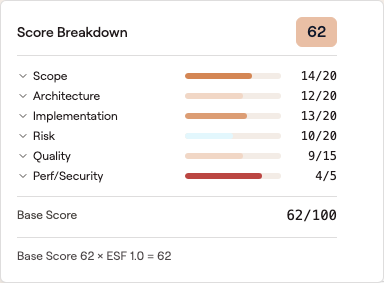 Click any score badge in the PR list to open the breakdown popover — every dimension is shown as a bar with its raw and max scores, plus the ESF calculation that produced the final number.
AI-Generated Summary
Alongside the numeric scores, GitVelocity generates a plain-language summary explaining why the PR received its score. The summary highlights the key factors -- whether the PR introduced new architecture, carried elevated risk, or included significant test coverage -- making it easy to understand the score without reading the entire diff.
Effort Scale Factor
The Effort Scale Factor (ESF) is displayed alongside each score, showing the raw size metrics that informed the analysis: lines added, lines removed, and files changed. ESF provides context for the score -- a high score on a small diff signals concentrated complexity, while a moderate score on a large diff suggests breadth over depth.
Browsing and Filtering
The PR list page shows all scored pull requests with columns for score, author, repository, and merge date. Use search to find specific PRs by title or author.
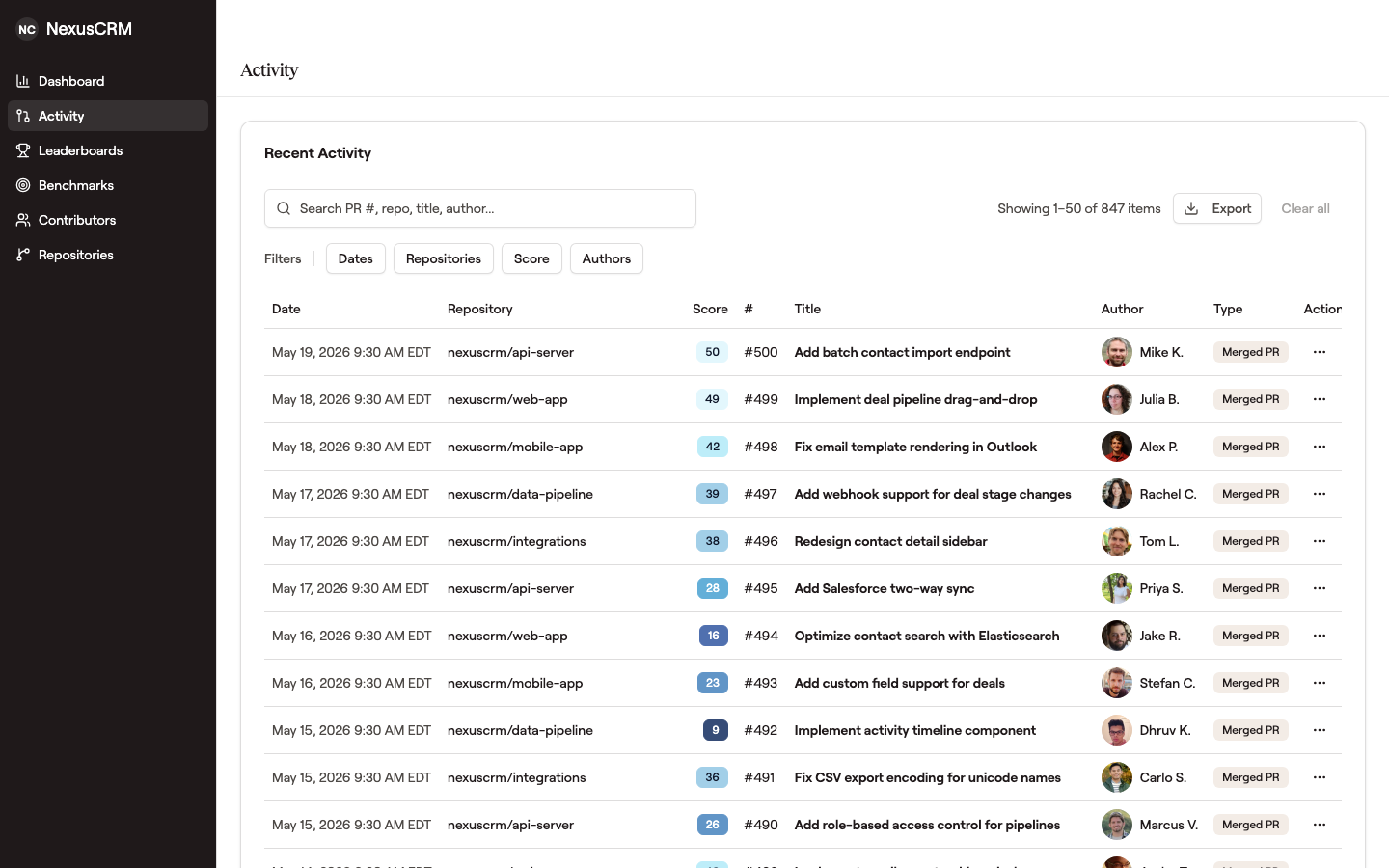 Score badges are color-coded by tier; click one to open the dimension breakdown popover above.
Filtering
Narrow the PR list using the filter controls at the top of the page:
- Date range -- select a start and end date to focus on a specific time period
- Repository -- filter to one or more repositories
- Score range -- set minimum and maximum score thresholds to find high-complexity or low-complexity PRs
- Author -- filter by one or more contributors
- Language -- filter to the PRs where a given language made up most of the diff (see Languages)
Filters combine with each other, so you can view all PRs by a specific author in a specific repository above a certain score threshold.
Sorting
Click any column header to sort the PR list. Available sort options:
- Score -- find the highest or lowest scoring PRs
- Date -- view PRs in chronological or reverse-chronological order
- Author -- group PRs alphabetically by contributor
- Repository -- group PRs by repository
Export
Use the export button to download the current filtered view as a CSV file. The export respects all active filters and sorting, so you get exactly the data you see on screen. This is useful for building custom reports in spreadsheets, sharing data with stakeholders, or feeding into external tools.
Detailed View
Click into any PR to see the full analysis: dimension sub-scores, the AI summary, ESF metrics, and a link back to the original pull request on GitHub. This detail view is useful during code reviews, 1:1 discussions, and retrospectives.