Integration Branches
By default, GitVelocity only scores pull requests that merge into your repository's default branch (usually main). If your team merges PRs into other long-lived or short-lived branches before they reach main, those PRs won't be scored — and the work they represent won't appear in your velocity data.
Integration branches solve this. Add branch names or wildcard patterns to tell GitVelocity which additional branches should trigger scoring.
Quick setup: Go to Settings > AI Scoring > Additional Scoring Branches and enter your patterns (e.g., feature/*). Then run a backfill to score historical PRs.
When You Need This
If any of these describe your workflow, you need integration branches configured.
Feature branch accumulation — Multiple PRs merge into a shared feature branch, which later merges to main as a single PR.
| Step | Merge | Without Integration Branches | With feature/* |
|---|---|---|---|
| PR 1 | into feature/checkout-redesign |
Not scored | Scored |
| PR 2 | into feature/checkout-redesign |
Not scored | Scored |
| PR 3 | into feature/checkout-redesign |
Not scored | Scored |
| Final merge | feature/checkout-redesign into main |
Scored as 1 PR (~40 pts) | Skipped (already counted) |
Without integration branches, three PRs worth of work collapse into a single score. An engineer who earned 150-200 points of real work sees ~40 points instead. With feature/* configured, each PR is scored individually and the final merge is automatically skipped.
Chained PRs — PRs that build on each other, each merging into the next branch before the final one merges to main.
| Step | Merge | Without Integration Branches | With feature/* |
|---|---|---|---|
| PR 1 | into PR 2's branch | Not scored | Scored |
| PR 2 | into PR 3's branch | Not scored | Scored |
| PR 3 | into main |
Scored as 1 PR | Skipped (already counted) |
Gitflow or release branches — Feature branches merge into develop or a release branch, which is periodically merged to main.
| Step | Merge | Without Integration Branches | With develop, release/* |
|---|---|---|---|
feature/auth |
into develop |
Not scored | Scored |
feature/payments |
into develop |
Not scored | Scored |
develop |
into main |
Scored as 1 PR | Skipped (already counted) |
Staging or QA branches — PRs target a staging branch for testing before promotion to main.
| Step | Merge | Without Integration Branches | With staging |
|---|---|---|---|
fix/checkout-bug |
into staging |
Not scored | Scored |
staging |
into main |
Scored as 1 PR | Skipped (already counted) |
How to Configure
Go to Settings → AI Scoring → Additional Scoring Branches and enter branch names or patterns separated by commas.
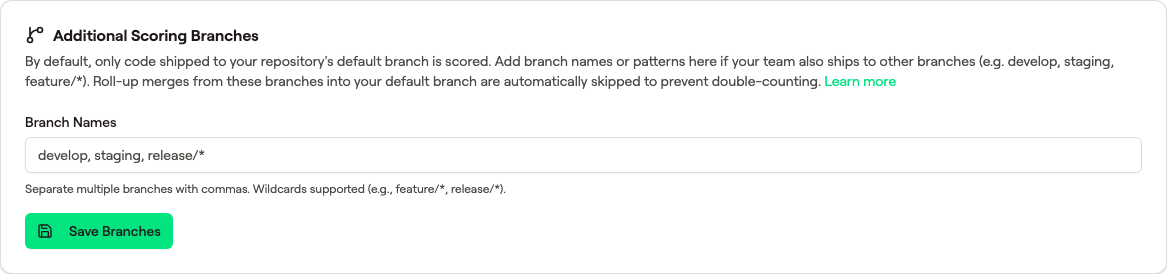 One comma-separated list. Wildcards are glob patterns (
feature/* matches every feature/... branch). Roll-up merges from these branches into main are skipped automatically — see the next section.
Exact Branch Names
For long-lived branches with stable names: develop, staging
Wildcard Patterns
For branches with dynamic names, use glob patterns: feature/*, release/*
feature/* matches feature/checkout-redesign, feature/payments-v2, feature/auth-refactor — any branch starting with feature/.
Common Configurations
| Workflow | Pattern |
|---|---|
| All feature branches | feature/* |
| Feature + release branches | feature/*, release/* |
| Gitflow (develop + release) | develop, release/* |
| Staging environment | staging |
| Multiple patterns | feature/*, release/*, develop, staging |
How Double-Counting Is Prevented
When integration branches are configured, GitVelocity automatically prevents the same work from being counted twice. Here's the logic:
- Component PRs (e.g.,
fix/authintofeature/checkout-redesign) are scored — the target branch matches the integration pattern. - The final merge (e.g.,
feature/checkout-redesignintomain) is automatically skipped — because the source branch matches an integration pattern, and the component PRs were already scored.
This means you get full credit for every PR without inflating numbers when the feature branch merges to main.
Detailed example with feature/*
Configuration: feature/*
| PR | Source into Target | Result | Why |
|---|---|---|---|
| Component PR | fix/auth into feature/checkout-redesign |
Scored | Target matches feature/* |
| Component PR | add/tests into feature/checkout-redesign |
Scored | Target matches feature/* |
| Final merge | feature/checkout-redesign into main |
Skipped | Source matches feature/* — already scored |
| Normal PR | fix/typo into main |
Scored | Source doesn't match any integration pattern |
Regular PRs that merge directly to main (like fix/typo into main) are always scored normally. The skip only applies when the source branch matches an integration pattern.
What Happens During Backfill
When you run a historical backfill, the same rules apply. PRs that targeted integration branches are scored, and final merges are skipped.
If your team was using feature branches before integration branches were configured, the final merges to main were already scored. The backfill handles this automatically: when it encounters a final merge that already has a score, it removes the old score to prevent double-counting. The component PRs are then scored individually, giving you accurate totals.
This works even for repositories that renamed their default branch (e.g., master to main) — the backfill checks all common default branch names.
Wildcard Pattern Reference
Integration branches use glob-style patterns:
| Pattern | Matches | Does Not Match |
|---|---|---|
feature/* |
feature/auth, feature/checkout-redesign |
feature/deep/nested (single level only) |
feature/** |
feature/auth, feature/deep/nested |
release/v1 |
release/* |
release/v2.0, release/sprint-42 |
release/v2/hotfix |
release/** |
release/v2.0, release/v2/hotfix |
feature/auth |
develop |
develop |
develop/something |
Use * for single-level matching and ** for deep matching. Most teams only need feature/* or release/*.
Tips
- Configure before merging — Integration branches must be set up before PRs merge into them. PRs that already merged won't be retroactively scored (but you can run a backfill to pick them up).
- Be specific with patterns — Avoid overly broad patterns like
*, which would match every branch and skip all merges to main. - Run a backfill after configuring — If your team has been using feature branches without integration branches configured, run a historical backfill to score the missed component PRs. The backfill won't double-count anything — it removes stale scores from final merges and scores the component PRs individually.
- Commit scoring works too — If commit scoring is enabled, pushes to integration branches are also scored.