MCP Server
Overview
GitVelocity ships an MCP (Model Context Protocol) server so any MCP-compatible AI tool — Claude Desktop, Claude Code, Cursor, or anything else that speaks the standard — can read your velocity data in conversation. Ask Claude "who shipped the most this sprint?" or "show me Alice's score breakdown for PR #128" and it queries GitVelocity directly.
The server is read-only, organization-scoped, and authenticates via OAuth 2.1 with dynamic client registration. No manual token setup is required — you authorize once in your browser when you connect.
Prefer the shell? The GitVelocity CLI wraps the same tools and auth in a gv command you can pipe, script, and run from CI.
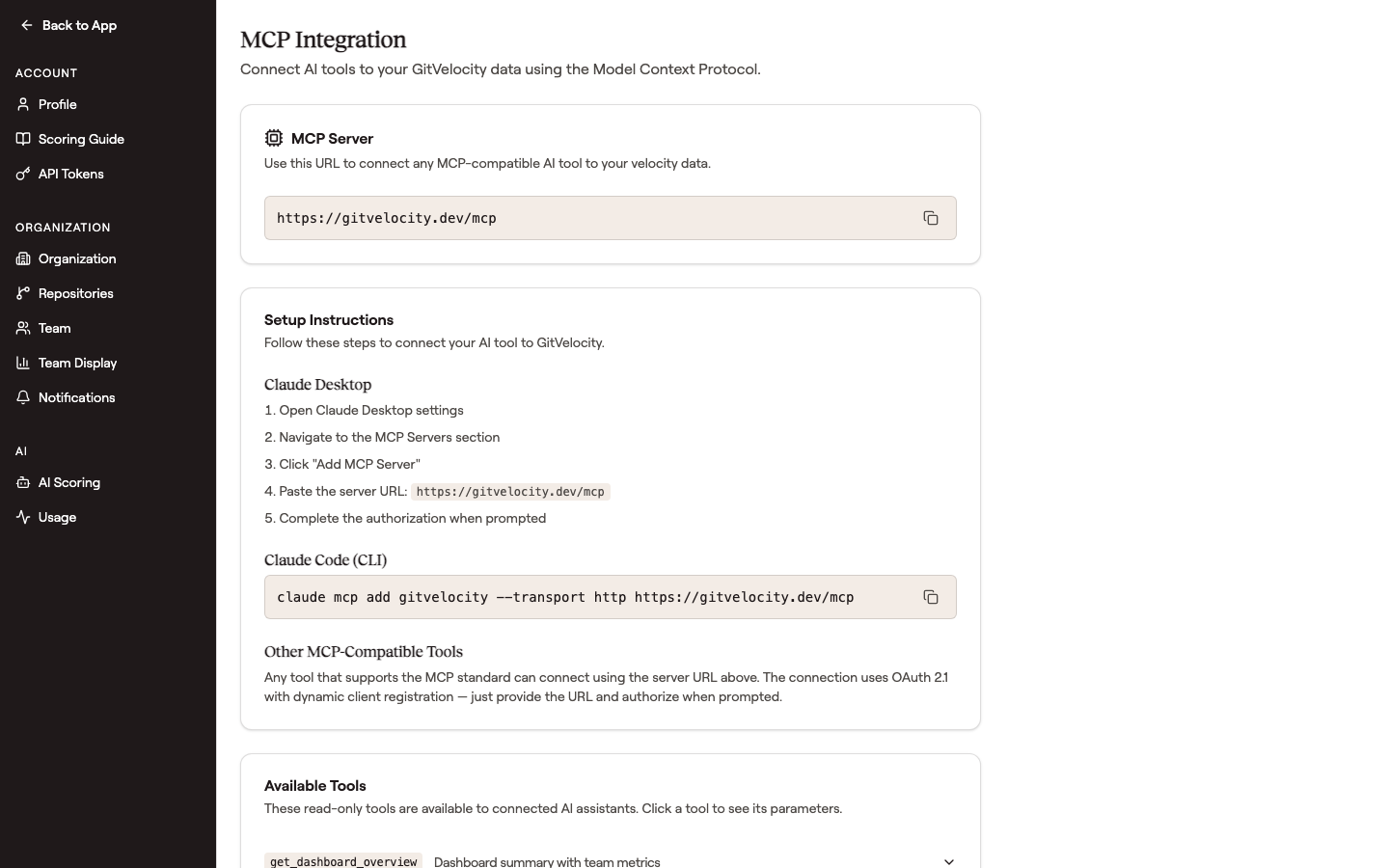 The settings page surfaces the server URL, copy-paste setup steps for Claude Desktop and Claude Code, and an expandable list of every read-only tool the server exposes.
Server URL
https://gitvelocity.dev/mcp
That's the only piece of configuration most clients need.
Quick start
Claude Code (CLI)
claude mcp add gitvelocity --transport http https://gitvelocity.dev/mcp
Claude Code opens a browser tab the first time it talks to the server. Sign in with the same account you use for the dashboard, pick the organization, click Authorize, and you're done. The token is stored locally by Claude Code; you never see or copy it.
Claude Desktop
- Open Claude Desktop settings.
- Navigate to the MCP Servers section.
- Click Add MCP Server.
- Paste the server URL:
https://gitvelocity.dev/mcp. - Complete the authorization when prompted.
Cursor, Continue, and other MCP clients
Any tool that supports MCP streaming HTTP transport can connect using the URL above. The connection uses OAuth 2.1 with dynamic client registration (RFC 7591) — you don't need to register an OAuth app or supply a client ID. Just point the client at the URL and authorize when prompted.
Authentication
The MCP endpoint accepts OAuth 2.1 bearer tokens issued by the dashboard's authorization flow. The flow is:
- Your MCP client hits
/mcpwithout auth → gets back aWWW-Authenticatechallenge with a discovery URL. - The client follows discovery to
/oauth/authorize, opens that URL in your browser, and you sign in. - You pick an organization on the consent screen and click Authorize.
- The client receives an access token good for 90 days plus a refresh token for 180 days. It refreshes automatically.
Personal Access Tokens are NOT accepted on /mcp. PATs minted from Settings → API Tokens authenticate against the REST API only. If you present a PAT to /mcp, the server rejects it with 401. This is intentional — the OAuth flow scopes a token to one user's session in one organization, while a PAT is a long-lived org-wide credential. We don't want a PAT leak to grant tool-calling access on top of read access.
Available tools
Every tool is read-only and scoped to the organization you authorized.
| Tool | Purpose |
|---|---|
get_dashboard_overview |
Team-wide summary with headline metrics |
get_activity |
Scored activity feed with filters and pagination |
get_score_details |
Full six-dimension breakdown for one PR or commit |
get_engineer_velocity |
One engineer's velocity and dimension scores |
get_engineer_achievements |
One engineer's achievement list |
get_engineer_trends |
One engineer's time series by day / week / month / quarter |
get_team_velocity |
Roll-up metrics for a custom team (comma-separated names) |
get_top_performers |
Top engineers by velocity score |
get_repository_rankings |
Repository performance rankings |
get_monthly_trends |
Monthly velocity trends across the org |
get_leaderboard |
Combined sprint / most-improved / consistency leaderboards |
get_sprint_leaderboard |
This week's sprint leaderboard |
get_recognition_feed |
Recent achievements and recognition |
The dashboard's Settings → MCP & CLI page lists each tool's parameters with an interactive accordion. Use it as the live reference when you're shaping a query.
Example prompts
Once connected, you can drop natural-language questions on the AI tool and it will pick the right call:
- "Who are our top 5 contributors over the last 30 days?" →
get_top_performers - "What did Alice ship this week? Pull her sprint scores." →
get_engineer_velocity+get_sprint_leaderboard - "Walk me through PR 482 in the backend repo, including the score breakdown." →
get_score_details - "Which repository has been moving fastest this quarter?" →
get_repository_rankings - "Show me the recognition feed — anything noteworthy this week?" →
get_recognition_feed
Limits
- Read-only. No write tools exist today. The MCP server cannot mutate state — no scoring triggers, no admin actions, no edits.
- Organization-scoped. Each token is bound to one organization at the consent step. Headline super-admins receive cross-organization tools automatically; everyone else sees only their authorized org.
- No per-tool rate limits on the MCP path today — usage is bounded by the underlying database query cost. We monitor traffic in Honeycomb and will introduce per-org budgets only if abuse appears.
- Token rotation. Access tokens expire after 90 days. Refresh tokens last 180 days and rotate automatically — most clients handle this transparently. If your client refuses to refresh, re-run the connect flow.
Revoking access
There's no MCP-specific revocation surface today (it's an open follow-up on our roadmap). For now:
- Removing your account from an organization invalidates every MCP token tied to that membership immediately.
- Deleting your account invalidates every MCP token for every org you belonged to.
Need an MCP token revoked sooner? Email support@headline.com and we'll force-expire the row.
Troubleshooting
401 invalid_tokenafter a long break. Your access token expired and the refresh token also expired (over 180 days idle). Re-run the connect flow.401 invalid_tokenafter switching orgs. The token is bound to the org you picked at consent. Disconnect and reconnect, then pick the new org.- Claude can see the tools but every call returns empty. Most likely cause: you authorized the wrong organization. Check the dashboard org selector and reconnect.
- Connection challenge loops in Claude Code. Make sure the URL is exactly
https://gitvelocity.dev/mcpwith no trailing slash and no path segments after/mcp.
If anything else looks broken, reach out via the in-app chat or support@headline.com.